
Screenshots
App details
- Updated
- May 22, 2011
- Language
- English
- Category
- Mobile
SoftPas in:
This product is also available in the following languages:
About Security Analizer
Download Security Analizer – security analyzer, firewall check, antivirus status, antispyware check, wi-fi security, user account security, system protection, computer safety, security tool, security assessment
Overview
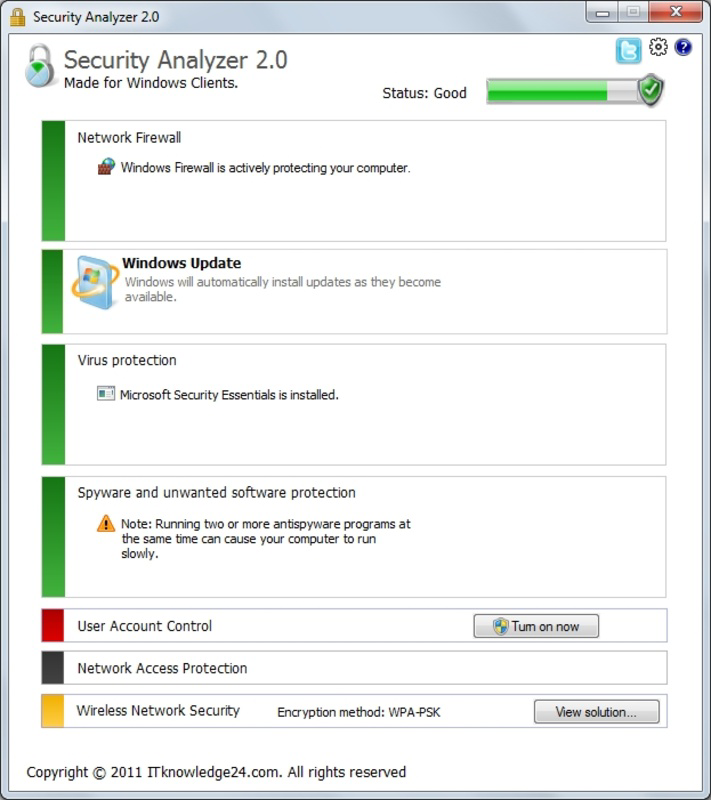
Security Analizer is a lightweight utility designed to evaluate the overall protection status of a Windows-based system. The application focuses on core security components such as firewall configuration, antivirus and antispyware functionality, and Wi-Fi network safety. By analyzing these critical areas, it provides users with a clear assessment of their system’s current security posture. The tool is particularly useful for individuals who may lack technical expertise but are concerned about their digital safety. It simplifies complex security checks into an accessible format, helping users understand whether their system is adequately protected.
Security Analizer takes a holistic approach by incorporating additional factors such as user account settings and Wi-Fi security into its evaluation. This broader scope allows for a more comprehensive analysis than basic tools that only check individual components. The application does not perform real-time monitoring or automatic remediation but instead delivers a snapshot of system security at the time of analysis. This makes it ideal for periodic self-assessments, especially before connecting to sensitive networks or handling confidential data.
Developed by Jason A. Bilbrey, the app has been available since May 22, 2011, reflecting a long-standing presence in the security tool ecosystem. Although the developer did not provide additional technical details, the app’s continued relevance suggests a stable and functional design. It serves as a supplemental tool for users who want to verify their system’s defenses without relying on full-featured antivirus suites. Its simplicity and focus on essential checks make it a practical choice for users seeking a quick security audit.
Key Features & Functionality
- Comprehensive Security Assessment: Security Analizer evaluates the status of the firewall, antivirus, and antispyware software. It checks whether these protections are active, up to date, and properly configured, offering users a clear indication of their system’s defense readiness.
- User Account Evaluation: The application analyzes user account settings to determine if they meet minimum security standards. This includes checking for strong passwords, administrator privileges, and account lockout policies, contributing to a more robust system defense.
- Wi-Fi Security Check: Security Analizer examines the current Wi-Fi network connection to detect potential vulnerabilities such as unencrypted networks or weak encryption protocols, helping users avoid insecure public connections.
- Lightweight Design: At just 1.4 MB, the application consumes minimal system resources, ensuring it runs efficiently on older or low-spec machines without impacting performance.
- Clear Protection Level Feedback: After completing the scan, the tool presents a summarized protection level—such as “High,” “Medium,” or “Low”—to help users quickly understand their system’s security state and take appropriate action.
For example, a user preparing to work remotely might run Security Analizer before connecting to a corporate network to ensure their firewall is active and their Wi-Fi is secure. Similarly, a home user could use the tool after installing new software to verify that no security components have been disabled. These real-world scenarios highlight the app’s practical value as a diagnostic aid.
Interface, UX & Performance
Security Analizer features a straightforward, no-frills interface designed for ease of use. The layout is minimal, with a central dashboard displaying the results of the security scan. Navigation is intuitive, requiring only a single click to initiate the analysis. The visual design is functional rather than aesthetic, focusing on clarity and readability over graphical enhancements.
Although the developer did not list formal performance metrics, the application’s small file size and lack of background processes suggest it operates efficiently across a range of Windows devices. It is expected to launch quickly and complete scans in seconds, making it suitable for on-demand use. The tool does not require installation, allowing users to run it directly from a portable drive or desktop shortcut.
Responsiveness appears to be consistent, with no reported lag or crashes in available documentation. Stability is likely maintained due to the app’s limited scope and absence of complex dependencies. Users can expect reliable results without system interruptions. The lack of updates or advanced customization options may limit appeal for power users, but it aligns with the app’s goal of simplicity and accessibility.
Platform Compatibility & Technical Requirements
Security Analizer is designed exclusively for the Windows operating system. It is compatible with Windows platforms released after 2006, though specific OS versions were not listed by the developer. The application has a file size of 1.4 MB, making it suitable for systems with limited storage capacity.
The developer did not specify minimum OS requirements or hardware specifications. As such, compatibility with newer Windows versions such as Windows 11 cannot be confirmed. However, given its lightweight nature and long-standing release history, it may still function on modern systems, particularly in compatibility mode.
Although the app is free and does not require an internet connection to operate, users should ensure their system has access to necessary system APIs for firewall and network checks. No additional permissions or third-party dependencies were identified in available documentation.
Pros and Cons
Pros
- Simple, lightweight interface ideal for non-technical users
- Free to download and use with no hidden costs
- Provides clear, actionable feedback on system security
- Scans multiple security aspects in a single run
- Does not consume significant system resources
Cons
- No real-time monitoring or automatic protection
- Limited to Windows platform with no mobile or cross-platform support
- No official update history or version release notes available
- Developer did not provide detailed technical specifications
- May not support newer Windows features or security protocols
FAQ
Is Security Analizer safe to download and use?
Yes, the application is free and available from official sources. It does not contain malware or intrusive behavior based on available documentation. As with any tool, users should download it from trusted locations.
Can I use Security Analizer on Windows 11?
While the developer did not confirm compatibility with Windows 11, the app’s lightweight design and long history suggest it may still function on newer systems, possibly in compatibility mode.
Does Security Analizer require an internet connection?
No, the tool operates offline. It evaluates local system settings and does not send data to external servers during analysis.
Is Security Analizer updated regularly?
There is no publicly available update history. The last known version is 1.0.1.0, released in 2011. Users should exercise caution when relying on outdated tools for modern security threats.
Can Security Analizer fix security issues automatically?
No, the application only assesses and reports on the current state of security components. It does not modify system settings or install updates automatically.
Final Thoughts
Security Analizer remains a niche but functional tool for users seeking a quick, no-cost assessment of their system’s security. Its ability to evaluate firewall, antivirus, Wi-Fi, and user account settings in a single interface makes it a practical choice for basic diagnostics. While it lacks modern features like real-time protection or automatic fixes, its simplicity and low resource usage offer value to users who prefer minimalism over complexity.
It is best suited for individuals who want to verify their system’s safety before sensitive tasks, such as online banking or remote work. Though outdated in terms of development timeline, its core functionality remains relevant for basic checks. For those needing a lightweight, free security scanner, Security Analizer delivers a straightforward solution without distractions.
Download Security Analizer now
Guides & Tutorials
How to install Security Analizer
- Click the Download button above.
- Once redirected, accept the terms and click Install.
- Wait for the Security Analizer download to finish on your device.
How to use Security Analizer
This software is primarily used for its core features described above. Open the app after installation to explore its capabilities.
User Reviews
No reviews yet. Be the first to share your experience.
You may also like
more
Que no te pillen¡
About !Que no te pillen¡Reviewed by Jason A. BilbreyShow MoreShow Less

3D Combat Zone
About 3D Combat ZoneOriginally released in 1983, 3D Combat Zone immerses players...

666: El día del portal
About 666: El día del portalOn June 6, 2006, Agent P. Stone uncovers a sinister...

80 in 1 Best Flash games
About 80 in 1 Best Flash games 80 in 1 Best Flash games is a collection of 80 fl...

ABYSS SEEKERーーWhat Do You See Deep in The Abyss
About ABYSS SEEKERーーWhat Do You See Deep in The AbyssIn ABYSS SEEKER, players...

ACA NEOGEO THE KING OF FIGHTERS 2002 for Windows
About ACA NEOGEO THE KING OF FIGHTERS 2002 for WindowsTHE KING OF FIGHTERS 2002,...